

by Simon the AIGuy.blog
Every Monday used to start the same way. Twelve account managers, thirty minutes each, going through their Outlook calendars one by one to figure out where I should be showing up that week. That is roughly six hours of my working week spent doing something that, if I am honest, a spreadsheet could have handled.
I am a subject matter expert working alongside account managers across things like Microsoft migrations, cyber security, business system upgrades and AI strategy. The idea is solid enough. I join their client meetings and help them have richer, more valuable conversations. The account manager gets to offer something more than the usual touchpoint and the client gets access to specialist knowledge they might not have realised they could tap into. It works. But the process of identifying where to show up each week was slow, manual and a bit of a drain on everyone involved.
What actually changed
I have been using Microsoft 365 Copilot for a while now. It handles the everyday stuff well enough. Email summaries, drafting documents, quick brainstorms. But when it comes to anything more integrated or nuanced I have tended to reach for OpenAI or Claude instead.
What caught my attention recently is that Microsoft has now licensed Claude Cowork and made it available through Copilot. I started exploring what that meant in practice and fairly quickly landed on something genuinely useful.
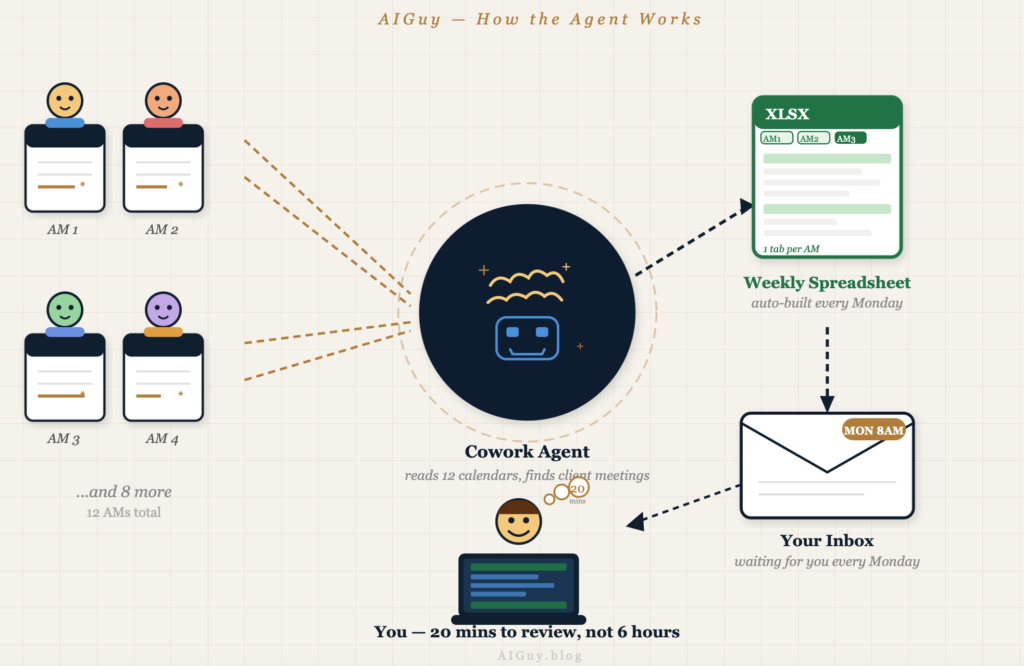
I (and I’m not technical) built an agent inside Copilot Cowork that connects directly to each account manager’s Outlook calendar. Every Monday 8am it pulls together all their client-facing appointments for the week, formats them clearly, drops everything into an Excel spreadsheet with a summary and a separate tab per account manager and sends it straight to my inbox. I open my laptop and the week is already laid out in front of me.
It took some setting up. There were permission issues to resolve before the agent could access multiple calendars across the business but once that was sorted it ran exactly as intended. No tweaking, no babysitting.
What I do with that time now
The six hours I was spending on calendar reviews doesn’t just disappear. I still review the spreadsheet and make decisions about where to focus my time. But I am doing that in twenty minutes rather than across a full day of meetings. The rest of that time goes back into the client conversations themselves where it should have been all along.
Time recovered
Six hours of calendar reviews condensed into a twenty minute read of a single spreadsheet
Better focus
Decisions about where to show up are now based on a full picture of the week rather than conversation by conversation
More client value
Account managers get specialist support more consistently and clients get conversations that go beyond the transactional
Repeatable process
The agent runs itself. No reminders, no manual input and no room for things to fall through the gap
Where this goes next
What I find genuinely interesting is that this is just the start. The calendar agent solves one problem but it has opened up a much bigger question. What else could be connected to it?
Product and service data
Pulling in what each client currently takes from us (and what they don’t) so every meeting has commercial context built in
Support desk insight
Surfacing common issues or sentiment from the IT support desk so problems can be addressed before they become a relationship risk
A rolling client roadmap
Moving each client relationship from reactive and transactional towards something genuinely strategic and joined up
None of this is new. The data already exists inside the business. The question is whether you connect it in a way that actually helps the people working with clients every day.
What this means if you are thinking about AI
This is not an article about replacing people or about AI doing something magical. It’s more about a repetitive process that consumed time without adding value and a relatively straightforward agent that removed it from the week entirely.
The honest truth is that most businesses already have the tools available to do something similar. Microsoft 365 is everywhere. The data is already there. What is often missing is someone taking the time to ask where the friction actually lives and then building something specific to address it.
AI works best when it is pointed at a real problem rather than deployed as a general-purpose solution. Start with the thing that slows you down most and work from there.
The time I got back will not make the headlines. But multiplied across a team, a department or an entire business that kind of quiet efficiency is exactly what separates businesses that are using AI from those that are genuinely benefiting from it.
Now, where else should I be looking…?
Simon
